Webflow Development

Webflow websites that are fast, beautiful, and easy to manage

Webflow gives you the best of both worlds: the design freedom of custom code with the ease of a visual CMS. I build Webflow sites that are pixel-perfect, responsive, and ready for you to update without touching a single line of code.

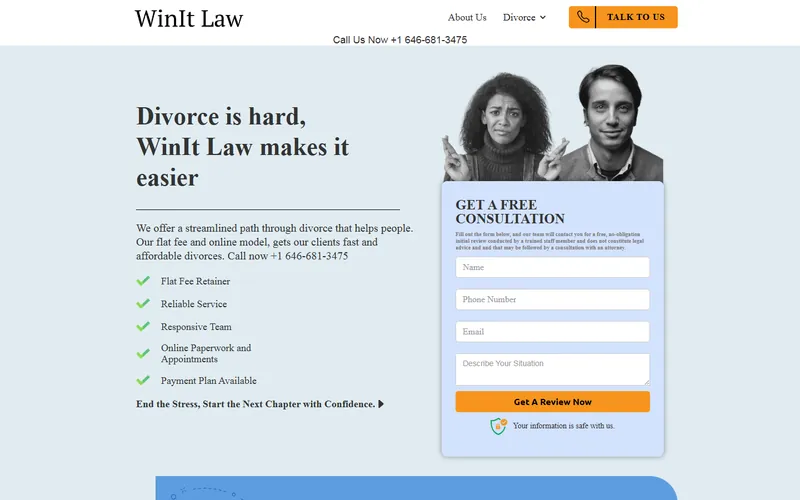
WinIt Law Webflow landing page built by JagpWeb

Who I Work With

When Webflow is the right call

You have a design and you need it built exactly. A Figma file approved by a designer or a brand team is the ideal starting point for Webflow, because Webflow doesn't make you fight a theme's assumptions. Spacing, type scale and grid come out as drawn, at every breakpoint, without the "close enough" compromises a template forces on you.

You don't want a site to maintain. Webflow includes hosting, SSL, a global CDN, backups and versioning. There is no server, no plugin updates, no security patches and nothing that breaks on a Tuesday because two extensions disagreed. For a marketing site that has to look sharp and stay up, that's a real advantage over WordPress.

Your team publishes content but can't code. Webflow's CMS separates content from design: a marketer adds a blog post, a case study or a team member through a form and it lands in a layout that was built once and can't be broken by accident. The design system stays intact no matter who's publishing.

What's Included

From design file to live site

  • 01

    Full Custom Webflow Builds

    Complete sites built from scratch on a structured class system, so the design stays consistent and future pages take hours instead of days.

  • 02

    Figma / PSD to Webflow

    Pixel-accurate conversion of an approved design, including the tablet and mobile behaviour the file usually doesn't specify — defined and shown to you before the build goes wide.

  • 03

    Webflow CMS & Dynamic Content

    Collections, reference fields, filtered lists and dynamic templates for blogs, case studies, services or team pages — set up so your team publishes without asking anyone.

  • 04

    Responsive & Mobile-First

    Built mobile-up and checked on real devices, because most of your traffic will never see the desktop layout the design was drawn in.

  • 05

    Animations & Interactions

    Scroll-triggered reveals, parallax, hover states, Lottie and GSAP where it earns its place — always with a reduced-motion fallback for visitors who ask for one.

  • 06

    Hosting & Launch

    Domain connection, SSL, 301 redirects if you're replacing an existing site, analytics and Search Console, plus the project transferred to your own Webflow workspace.

Webflow Work

A Webflow build in production

WinIt Law divorce services Webflow landing page
Webflow Legal United States

WinIt Law Divorce

A flat-fee divorce service for a US law firm. The page has a single job: turn a stressed visitor searching at a bad moment in their life into a booked free consultation, without the cold formality most legal sites default to.

  • Conversion-focused single-page structure with one clear action
  • Inline free-consultation form instead of a separate contact page
  • Flat-fee and payment-plan messaging placed where the price objection appears
  • Built for paid traffic: fast load, no distractions, mobile-first
Visit the live page

How It Works

How a Webflow project runs

  1. 01

    Scope & design review

    If you have a Figma file, I review it for anything that can't survive contact with a browser: undefined breakpoints, fonts without licences, layouts that only work at one width. If you don't, we define the pages first. You get a fixed price and date.

  2. 02

    Style system first

    Colours, type scale, spacing and reusable components built as a class system before any page is assembled. This is the step that decides whether the site is maintainable a year from now.

  3. 03

    Build, CMS & interactions

    Pages assembled from those components, CMS collections wired to their templates, interactions added last so they enhance a layout that already works without them.

  4. 04

    Launch & handover

    Domain, SSL, redirects, analytics and Search Console connected, the project transferred to your workspace, and a walkthrough video of the Editor so your team can publish from day one.

Tech Stack

What I build with

  • Webflow
  • Webflow CMS
  • Figma
  • Custom JavaScript
  • Finsweet Attributes
  • Lottie
  • GSAP

Questions

Webflow development FAQ

What is Webflow, exactly?

A visual development platform. Instead of writing HTML and CSS by hand, I build with the real box model, flexbox and grid on a canvas, and Webflow outputs clean production code. It includes a CMS and hosting, so there's no server to manage, no plugins to update and nothing to get hacked. The important part for you: it's a developer tool that produces an editor a non-developer can actually use.

Can I update the site myself?

Yes. Webflow's Editor lets you click any text or image on the live page and change it, and CMS collections give you a simple form for adding blog posts, team members or case studies. You can't accidentally break the layout, because design and content are kept separate. You get a walkthrough video recorded on your own site.

Webflow or WordPress — which should I choose?

WordPress when you need complex functionality: memberships, bookings, multilingual content, a large shop, or an existing site with years of content behind it. Webflow when the site is design-forward marketing — a company site, a product launch, a portfolio — and you want it to look exactly like the design, load fast and need no maintenance. Undecided? Tell me what the site has to do and I'll tell you which one I'd use.

Can I sell products on Webflow?

For a small catalog, yes — Webflow Ecommerce handles a handful of products, variants and a hosted checkout perfectly well. Past roughly fifty products, or as soon as you need serious inventory management, multi-channel selling or abandoned-cart flows, Shopify is the better tool and I'll say so rather than force the platform.

Do you work from a Figma design?

Often — it's one of the most common requests. I build a class system that mirrors the design tokens rather than styling each element individually, so the site stays consistent and future changes take minutes. If your file only covers desktop, I define the tablet and mobile behaviour and show it to you before building the whole site on top of it.

Who pays for Webflow hosting?

You do, directly to Webflow, on your own account — which matters, because it means you own the project and are never locked to me. I can build inside your workspace or transfer the finished project to it. Webflow hosting includes SSL, a global CDN, backups and versioning, which is why these sites need no maintenance plan.

How long does a Webflow site take?

A marketing site of five to eight pages takes 2 to 3 weeks. A Figma conversion of an approved design is faster, often 1 to 2 weeks, because the design decisions are already made. Heavy CMS work and complex interactions add time. You get a fixed date with the quote before we start. Get a free quote

Ready to build something great?

Send me your design or your brief and I'll get back to you within 24 hours.

Get a Free Quote contacto@jagpweb.com